
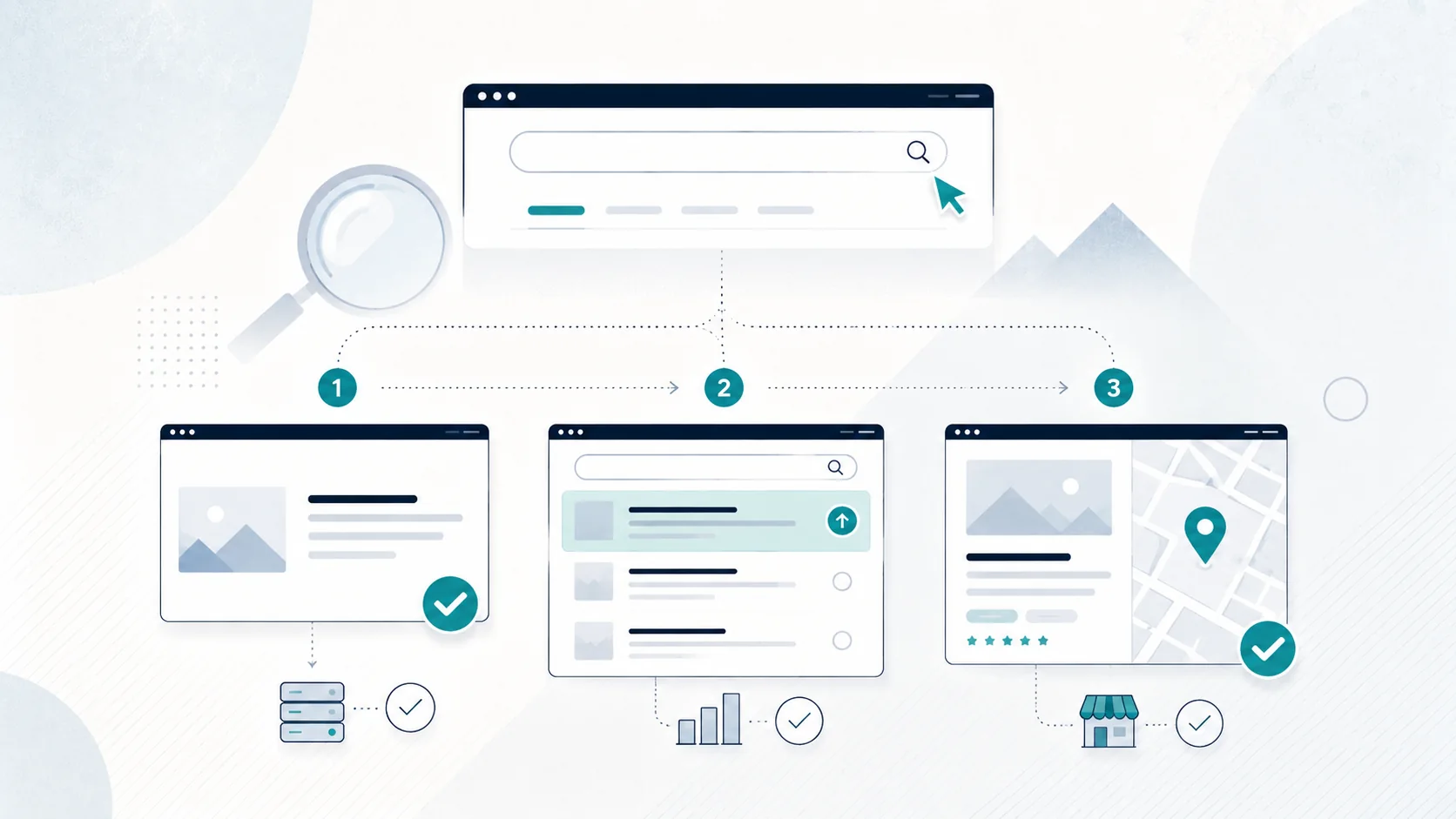
Quick decision tree
Question 1: Can Google find the exact page in Search Console?
- No: investigate indexing and discovery.
- Yes: move to Question 2.
Question 2: Does the page appear when you search your business name, but not for a broader service search?
- Yes: you probably have a ranking/relevance problem, not an indexing problem.
- No: inspect the page and brand search more closely.
Question 3: Are you actually trying to appear in the map results for a local search?
- Yes: check your Google Business Profile and local-search signals separately.
That simple split avoids a lot of wasted work.
First: is your website actually indexed?
"Indexed" means Google has processed a page and stored it in its search index so it can potentially be served in search results.
Being live on the internet does not guarantee indexing. Google says it does not guarantee that every page will be crawled, indexed or shown, even when the page follows its technical requirements.
For a small-business owner, the most reliable place to check a specific page is Google Search Console's URL Inspection tool.
Use Search Console URL Inspection
If you have Search Console set up:
- Open your Search Console property.
- Paste the full page URL into URL Inspection.
- Check whether Google reports the URL as indexed.
- If it is not indexed, read the reason shown.
- Use "Test live URL" if you have fixed a problem.
- You can request indexing after the page is accessible.
Requesting indexing is a request, not a guarantee. Repeatedly clicking it does not force an instant ranking.
For multiple pages, a sitemap is the more appropriate discovery method.
Can I just use a site: search?
You can try a search such as:
site:yourdomain.co.nz
It is a useful quick check, but Google says the site: operator is not necessarily exhaustive. A URL can be indexed even if it does not appear in a particular site: query.
Use Search Console when you need a dependable diagnosis for a specific page.
Why a new website may not be indexed yet
New sites can take time to be discovered and processed, particularly when very few other pages on the web link to them.
Google discovers URLs in several ways, including links from pages it already knows and sitemaps.
If the site has just launched, check the basics before assuming something is broken:
- Is the website publicly accessible without a password?
- Does the Home page link to the important pages?
- Is there an XML sitemap?
- Is the site verified in Search Console?
- Has the sitemap been submitted or otherwise made discoverable?
- Does URL Inspection say Google can access the page?
A sitemap helps Google discover URLs. It does not guarantee indexing or higher rankings.
Technical reasons a page may not appear
You do not need to become a technical SEO specialist, but there are a few common issues worth recognising.
The page has a noindex instruction
A noindex directive tells search engines not to index the page.
This can be left behind accidentally after a website was hidden during development.
Search Console's URL Inspection report can tell you whether indexing is allowed.
Google cannot access the page
Server errors, access restrictions or other technical problems can stop Google from fetching a page successfully.
Again, URL Inspection is the easiest first check for a business owner.
Robots rules block crawling
A robots.txt rule can stop Googlebot from crawling certain URLs. This is a different mechanism from noindex, but a bad configuration can still interfere with discovery and troubleshooting.
If a developer has recently launched or moved your site, ask them to confirm that temporary development blocks were removed.
Google sees the page as a duplicate
Google may group very similar URLs and choose one as the canonical version.
If you have multiple URLs showing essentially the same content, the exact one you are checking may not be the version Google chooses to index or display.
You do not need to diagnose canonicalisation from scratch. Search Console can show Google's selected canonical for an inspected URL.
The page is extremely thin or unclear
Technical accessibility is only part of indexing. Google also evaluates pages during indexing, and not every crawl results in a page being stored.
For a small-business site, make sure important pages contain real information about the business rather than only a heading, a stock image and a contact button.
Indexed but not ranking: what that means
This is probably the most common misunderstanding.
Suppose your Christchurch painting business appears when you search its exact name, but it does not appear on page one for "house painter Christchurch".
Your website is on Google.
It simply is not ranking where you want for that broader, more competitive search.
That is a different job from "getting indexed".
Why can a page be indexed but rank poorly?
There is no single answer. Common reasons include:
- the page does not clearly match the searcher's intent
- the service is barely explained
- the site has weak or confusing page structure
- competitors have stronger pages and reputations
- the business has little relevant authority or local prominence yet
- the page targets too many different services at once
- important location or service information is missing
- the site is new and has very little history or external recognition
Do not respond by stuffing the same keyword into every paragraph.
Start by asking whether the page is genuinely one of the best answers your business can provide for that specific customer search.
Check what page should rank for the search
A common small-business structure problem is expecting the Home page to rank for every service.
Imagine a company offers:
- house washing
- gutter cleaning
- roof treatments
If each service has enough distinct information and customer demand, individual service pages may be more useful than forcing the Home page to explain everything equally.
On the other hand, if the services are tiny variations of the same thing, creating separate thin pages may make the site worse.
Good page structure follows real customer topics, not a spreadsheet of keyword variations.
Make sure your business information is clear
For a local service business, the website should make basic facts easy to understand:
- what the business does
- where it operates
- how to contact it
- which services are actually offered
- who is behind the business where relevant
- evidence such as genuine reviews or projects
Do not hide the service area in a footer line and expect Google or customers to infer everything else.
Clear information helps humans first. It also gives search engines better context.
Do you mean Google Maps or the local results?
If you are searching "electrician near me" or another local service and looking at the map results, your website's indexing status is only one part of the picture.
Google Business Profile is the system businesses use to manage how eligible businesses appear on Google Search and Maps.
Google says local results are mainly based on:
- relevance: how well the Business Profile matches what someone is looking for
- distance: how far the business is from the searcher or location used in the search
- prominence: how well-known the business is
That means there is no setting on your website that can guarantee a top-three Maps position.
Google Business Profile checks
If your issue is Maps/local visibility, check:
- Is the business eligible for a Business Profile?
- Has the profile been claimed and verified where required?
- Is the business name accurate?
- Is the primary category appropriate?
- Are service area or address details accurate?
- Are phone, hours and website details current?
- Does the profile comply with Google's representation guidelines?
- Are you collecting genuine customer reviews rather than manufacturing them?
Google specifically recommends complete and accurate business information for local visibility.
Website + Google Business Profile work together
Your Business Profile and website solve related but different problems.
The profile helps people discover and assess the business in Google Search and Maps. The website gives them deeper service information, project examples and a controlled enquiry path.
A useful local setup is:
Google Business Profile -> Website service page -> Enquiry
or:
Google Search result -> Website -> Contact
Relying only on a Facebook Page or only on a website can leave gaps as a local business grows. See Do I Need a Website If I Have a Facebook Page? for the wider channel comparison.
What should I fix first?
Work in this order.
1. Confirm indexing
Use Search Console URL Inspection on the Home page and important service pages.
2. Fix access or indexing blocks
Resolve noindex settings, crawl/access issues, broken URLs or launch mistakes before rewriting content.
3. Confirm discovery
Make sure important pages are linked internally and included in a sensible sitemap.
4. Separate brand visibility from service ranking
Search the business name. Then assess broader service searches separately.
5. Improve the page that should answer the search
Make the service, location, proof and next step clear. Do not create duplicate pages for every minor keyword variation.
6. Check Google Business Profile for local searches
If your real goal is Maps visibility, work on the profile and local business information as well as the website.
7. Give legitimate changes time
Google's systems need to crawl and process changes. Search Central notes that crawling can take from days to weeks, and requesting a crawl does not guarantee immediate inclusion.
What not to do
Avoid these panic fixes:
- submitting the same URL for indexing over and over
- adding your city name to every sentence
- buying a bundle of random backlinks because the site is new
- creating dozens of near-identical location pages
- paying someone who promises a guaranteed #1 ranking
- assuming a website redesign alone will automatically fix local Maps visibility
Diagnose the actual problem first.
When the website itself may need work
Sometimes the technical side is fine, but the site still does a poor job explaining the business.
If important services are buried, mobile pages are awkward, the copy is vague, the site looks unfinished or customers cannot easily find a way to enquire, improving the website may be worthwhile even before rankings are considered.
No website provider can guarantee Google rankings. The useful goal is to remove technical barriers, build pages that genuinely answer customer searches and make your local business information accurate and trustworthy.